
What Blackmagic Announced at NAB 2026 (And What Your Students Will Ask You About)

The texts started before I even left the building.
The NAB announcement dropped and my phone started moving. Teachers, a couple of CTE directors, a few people I hadn’t heard from in months. All asking the same two things: What is this? How does it work?
So I did what made sense. I sat down with Nick Martins and Dave Tilley from Blackmagic Design and asked them directly.
Here’s what you need to know.

The Photo Page Completes the Pipeline
DaVinci Resolve has a new page – photo – and it finishes something Blackmagic has been building toward for a while.
The workflow now runs: media, cut, edit, color, Fairlight, photo, delivery. Beginning to end, one program. Same controls, same naming conventions, same project for your stills and your video.
If you’ve been splitting your workflow between programs – video here, photos there – this closes that gap. The consistency argument for Resolve just got a lot easier to make to a new teacher.
But here’s the thing David said that I want you to hold onto. When I asked him what a brand new teacher most needs to understand about DaVinci Resolve, his answer wasn’t color grading. Wasn’t effects. Wasn’t AI.
Media management.
Get organized before you do anything else. Naming conventions. A consolidated project. One location for your footage. Because if you skip that step, everything downstream gets harder – and the program is only as efficient as the organization behind it.
Teach that first. Teach it every semester.
Two Classes, One Project
This one is worth stopping on.
Dave mentioned schools where the video production class handles the edit and the audio class handles the mix – at the same time, on the same project. No drives moving across the hallway. No version confusion. Two sections, logged in, each doing their part.
The collaboration tools in Resolve came out last year. What’s new is how some programs are actually using them. And if you’ve got two groups in your building – or even two sections of the same class – there’s a workflow here worth building intentionally.
Your program might already be doing something like this. If it’s not, it’s worth the conversation.
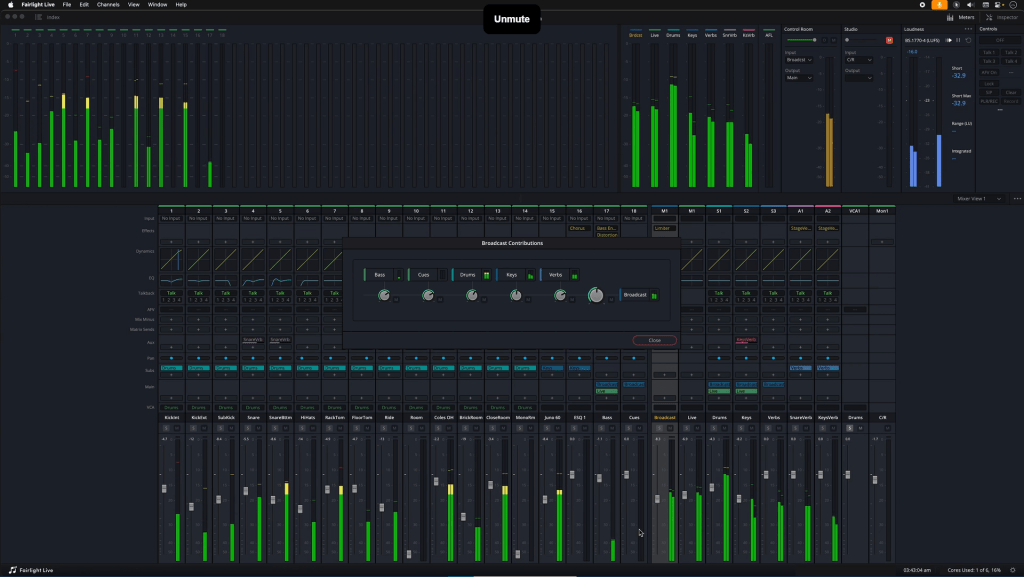
Fairlight Live Is for Your End-of-Year Show
If your program does live production – a concert, a broadcast, a capstone performance – this one’s for you.
Fairlight Live pulls it all together inside the Blackmagic ecosystem. Mix the room for the audience. Pair with your recording simultaneously. You’re not handing off a drive after the show and hoping it syncs. Your video and audio are paired before the lights even go up.
One caveat Dave was upfront about: it runs on a separate computer. No CPU in the mixer. That factors into your setup conversation. But it works on a MacBook, so it’s not out of reach for a school program without a lot of hardware budget.
If you’re building toward a live show as a capstone experience, this changes what that production can look like.

The AI Voice Thing
I’ll be straight with you. This one stopped me.
Someone texted me right after the announcement and said the AI voice tool was the coolest thing they’d seen all year. I understood why when Dave explained it.
Ten to fifteen seconds of someone’s voice. That’s all it takes to train the model. After that, you type the line… and it comes out in their voice.
Dave’s example: your talent doesn’t show up for the shoot. You’ve got footage of them. You’ve got ten seconds of them talking. You type the line they forgot to say – and they say it.
At the Hollywood level, there are contracts for that. At the high school and college level, there aren’t.
That’s not a problem with the technology. It’s a conversation your program needs to be having. Because your students are going to find this. And if you don’t frame it – the ethics, the implications, the *this is remarkable and also worth being careful with* – you’ve missed a classroom moment.
Dave said it himself: “It’s really cool and really scary.”
Yeah. That’s about right.
The face aging tools fall in the same category. Intelligent object tracking. AI-assisted effects that used to take two days and now take twenty minutes. The whole arc of this release is about reclaiming time – the hours spent on tedious processes that kept you from the creative work.
My daughter does some editing. I thought about all the hours I spent tracking objects frame by frame… and how she’ll never have to. That’s the honest reaction. You can feel grateful and slightly irritated at the same time. The tools are getting smarter. Your job is to make sure your students understand what they’re holding.

What to Do With This
You don’t have to master all of it before Monday.
Pick one thing. Look at the photo page if you’re already in Resolve. Watch one walkthrough on Fairlight Live if you’re building toward live production. Have the AI voice conversation with your advanced students if they’re ready for it.
The question isn’t whether your students are going to encounter these tools. They already are.
The question is whether they’re going to encounter them with you… or without you.
About the Author: Tom White
Tom White is the director of business development at Amitrace. Tom’s role is to help educators build better programs through better training, planning, and equipment. Before joining Amitrace, Tom was the Broadcast Engineer at Grady College of Journalism and Communication at the University of Georgia. Prior to that role, Tom taught at Morgan County High School and Rockdale Career Academy where he and his student produced thousands of live streams for sports, news, and community events. Tom is a member of the SkillsUSA Georgia Board of Directors and also serves as a contest tech chair for SkillsUSA Alabama and Tennessee.