Get Ready For Hoops Season!
Gear up for high school basketball season with tips on training student broadcast teams and live sportscasting. Discover how to build play-by-play commentary skills, manage game coverage, and utilize the StreamSemester Spotter app for real-time stats, scorebug overlays, and box scores to enhance student broadcasts.
Making the Move to Indoor Games
I have a problem. I know it but last night I realized how bad of a problem I have. I was at my daughter’s last football game of her high school career – she’s not on the team… she’s in the band – and I realized exactly how bad my problem is.
I was watching the game from the stands and doing play by play in my head. I’m really quite embarrassed to share that. I immediately tried to stop but by the end of the next drive, I was at it again. I love doing play by play and color for live broadcasts. I enjoy doing it for football but I LOVE to do it for basketball.
I think the transition from 100+ player teams with 22 on the field subbing in and out during the hundred plus plays paired with the unknown related to the weather to 12-15 player teams indoors with temperature control is what makes me like basketball more. I also played basketball in high school and had a great intramural team my freshman year of college (Supercali til I die… our team name was Supercalifragilisticexpialidocious). We were the B-league champions in 1998.
Basketball can feel like it moves at 100 miles per hour and often building student talent teams requires a lot of on the job training to get the pace of the game and be able to talk about it without thinking. Your task is to build the skills of the students while trying to create a palatable show. First, remember… they aren’t supposed to be good. They are students. Therefore, their first games will not be good. Your task is to encourage and support them. As for the palatable show, keep it simple to start – 1 camera, graphics, and go. Especially if you are trying to build an on-air talent team. The viewer can mute the audio if the talent is terrible but give them something worth watching if they do.
How I’d Build the Team
Here’s how I would train my team if I had to start from nothing right now:
- Build a group of 4-6 students who are interested
If you only have two students work as talent, then you will have games where there will be no one on the microphone. Most high schools have the girls and boys games on the same nights. You need at least 4 for each night of games (more on that later) Having some talent “on the bench” is going to be a win long term. If they aren’t the on-air talent that night, they can be sideline reporters or analysts who are on the air during halftime.
- Have them practice.
Just like the basketball team practices, your team should too. It’s simple, get them all together, pull up a game, assign roles (play by play, analyst), and have them call a quarter – IN FRONT OF THE TEAM. Build their confidence in small groups before you put them on the air.
As they call the game, take notes. Pay attention to things they do well and things that need improvement. Always sandwich needs improvement between things they did well..
Repeat the process regularly. This could mean “re-calling” their broadcasts as they get started.
- Limit their reps to start
Do not overwhelm them as they get started. Have the team focus on one game per day. Getting comfortable with 2 teams of 20 players and the flow of the game is going to be difficult. Don’t make it double.
- Give feedback constantly
You should listen to their broadcasts as they are doing them and make notes. If possible, give them feedback immediately. Shameless plug for what I believe is the best on-air talent training tool for schools. The Henry Engineering Sportscaster setup is tremendous and allows for backline conversations so you can coach your talent live and not have to worry about what you say going on the aid.
Ultimately, if you try to wait until after the game for all of the comments, you will have allowed bad habits to be built. If their presentation feels like every point is the triple overtime game winner for the championship of the world, they need immediate correction!
- Set them free!
Once they are comfortable and you are comfortable with their abilities…. Let the call anything they want. The great part of a lot of these automatic broadcast tools (HUDL, PIXELLOT, etc) is that it just takes a simple cable to get into the system to add play by play and talent to the broadcast. Let the kids call games – middle school, freshman, JV, pick up games… anything. The power of repetitions can not be beat!
Equipment Needs
Adding live talent to your broadcast doesn’t take a ton of equipment to get started. An audio mixer, a couple of microphones, and a couple of headphones is all you need. What that looks like is all dependent on your budget. I have done play by play with a pair of USB headphones plugged directly into the computer and I have used the complex systems with multi channel talkback and intercoms. All that matters is that the audio from your talent sounds good and the mics aren’t over driving the input.
As I sat there last night doing play by play in my head, I got frustrated because I didn’t know how many yards the play went for… Again, I know if I have a problem – that’s honestly why I don’t watch sports on TV…That thought hung with me all night and this morning I got up and created something for basketball season. It’s too late for football at this point.
I created the StreamSemester Spotter. It’s an app that you will download on a computer that will give you the tools to keep stats for the basketball season. I really think this will help your on-air talent and your broadcast tremendously! You’ll need someone to run it for the team (maybe one of the talent for the next game… or a kid that wants to be on the air but needs more practice).
The StreamSemester Spotter is a stat tracker with an output for your talent so they can see up to the minute stats, the current run, and other information they need. At the end of the game, there is a CSV file that can be downloaded so you can keep season stats. You may want to talk with your coaching staff and see if they have someone who will run it for you so they can have the stats! (partnerships with people who know what they are doing are always a win!)
Click here to download the app: StreamSemester Spotter
How the App Works
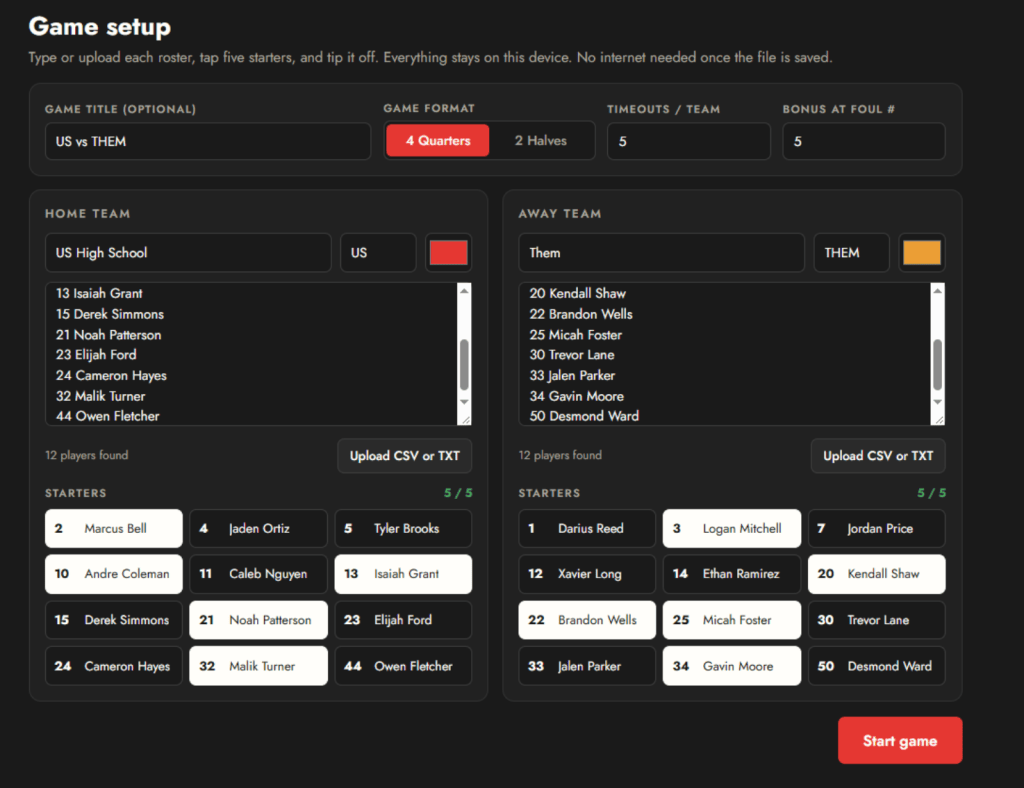
Input the game title, set the format (quarters or halves), input the team names and abbreviations. Finally rosters can be manually entered line by line or can be pasted from somewhere else (Remember to put number then name). Once you have the names in the roster, you can select the starters.
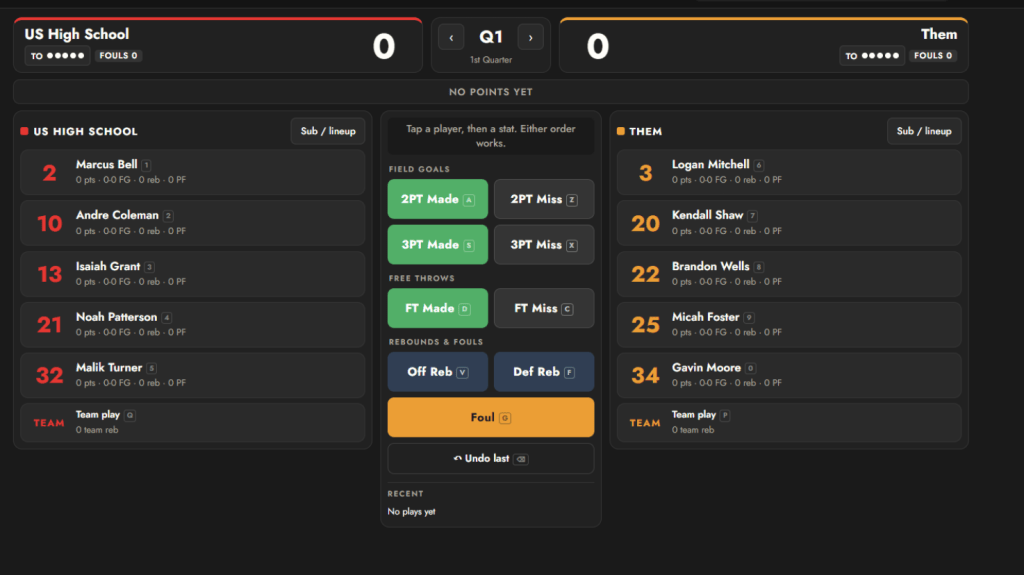
After you have entered all of the information, hit start game. Then you simply lick on the player and the action from the court. You will notice that there are shortcuts by each player and action. You can click the screen or use shortcuts.
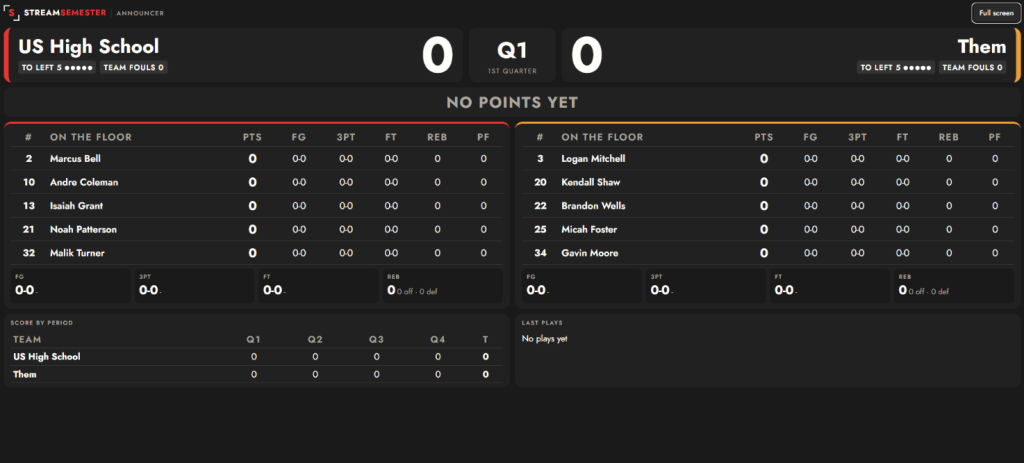
Across the top of the window there are options that are crazy important for a broadcast.

Box Score is just that – the running box score for the game. Play-by-Play is the running log of plays from the game. Announcer is the small announcer screen that gives the players on the court, player stats, team stats, score by period, the current scoring run and more. These three things take over the Spotter screen. This means you can’t add content with those up. BUT, you will also see Pop-out announcer this is so you can take the announcer screen to a second monitor. Take an HDMI feed from your laptop to another monitor for your talent and they can see all of the announcer content on that screen while the spotter adds content.
Finally, because I can’t just have it serve one role. The StreamSemester Spotter does have a scorebug built in. The same content input on the spotter can feed your scorebug. It’s a simple scorebug but effective. Set up your chroma settings, position, size, and open the scorebug and it’s ready to go.
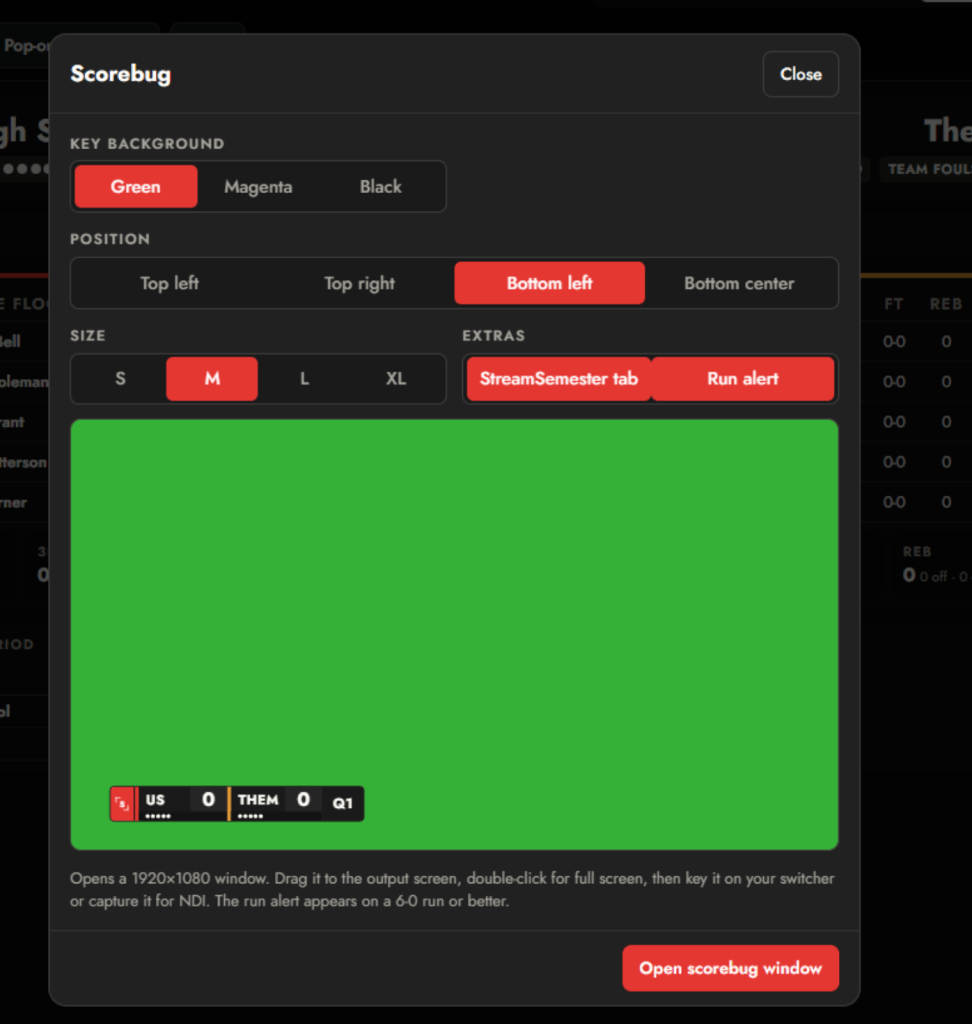
My goal is to have the system work without the need for internet but the scorebug will work best if it is done over NDI. If you have another HDMI or USB out on the computer, you can input it via those as well. Just place as an input, key out the color, and you should be good to go. I kept the graphics motion and design simple so there isn’t any fraying when it’s live.

The best part… if you don’t have a play by play team that night, you can still use the graphics for your broadcast! You can download the StreamSemester Spotter here.
Please let me know how you like it! Have an awesome basketball season.